
Writing a rule
This guide shows you how to build a risk rule from criteria, choose its period and scope, and read what happens when it trips.
1. How a rule is built
A trading account has one risk policy. The policy is a list of rules. Each rule has a name and one to four criteria. A rule trips when all its criteria are true. The account is blocked when any rule trips.
Each criterion has the same shape:
- Subject: everything the rule applies to (the account or the route), one strategy, one symbol, or one strategy on one symbol.
- Period: minute, day, week or month, for measures that are counted over time.
- Operator: >= or >.
- Threshold: a whole number in the measure’s unit (see section 2).
A rule is assigned either to the whole account or to one or more of its routes. A route rule counts only that route’s orders and positions. An order on a route must pass the rules assigned to that route and every account-wide rule. The route is checked first, then the account.
Every account also has guards. These come from the account’s limits (order volume, open positions, orders in flight, price age, orders per minute and the automatic stop). You cannot delete guards; change them in the Limits section instead.
2. Measures and units
There are twelve measures in three groups. The dashboard shows them by the names in the second column.
| IN AN EXPRESSION | IN THE DASHBOARD | PERIODS | UNIT |
|---|---|---|---|
| loss, profit | Loss, Profit | day, week, month | Account currency |
| loss_pct, profit_pct | Loss / Profit in % of balance | day, week, month | Percent of balance at period start |
| trades | Trades opened | day, week, month | Count |
| orders | Orders | minute, day, week, month | Count |
| open_positions | Open positions | none (counted now) | Count |
| net_volume | Net volume | none (counted now) | Lots |
| in_flight | Orders in flight | none (counted now) | Count |
| order.volume | Order volume | none (each order) | Lots |
| order.quote_age_ms | Price age | none (each order) | Milliseconds |
| order.spread_points | Spread | none (each order) | Points |
There is also order.net_volume, shown as “Net volume of the symbol after the order”.
The form accepts decimals. Inside an expression every threshold is a whole number:
- money in minor units, so 50000 means 500.00 in the account currency;
- percentages in basis points, so 200 means 2.00 %;
- lots multiplied by 108, so 10000000 means 0.1 lots.
For profit and loss criteria you choose what counts: Closed and open positions (the default) or Closed positions only.
3. Periods and latches
Periods follow the broker’s server time, not your server’s clock. A day runs from 00:00 to 24:00, a week from Monday 00:00, and a month from the 1st at 00:00.
When a rule with a period trips, it latches. It keeps blocking new orders until the end of its longest period, even if its condition stops being true sooner. A rule with a day and a week criterion latches until the end of the week.
A rule with no period never latches. A rule built only from order measures refuses each order it is true for. A rule with “counted now” measures refuses new orders only while it is true.
4. Add a rule in the dashboard
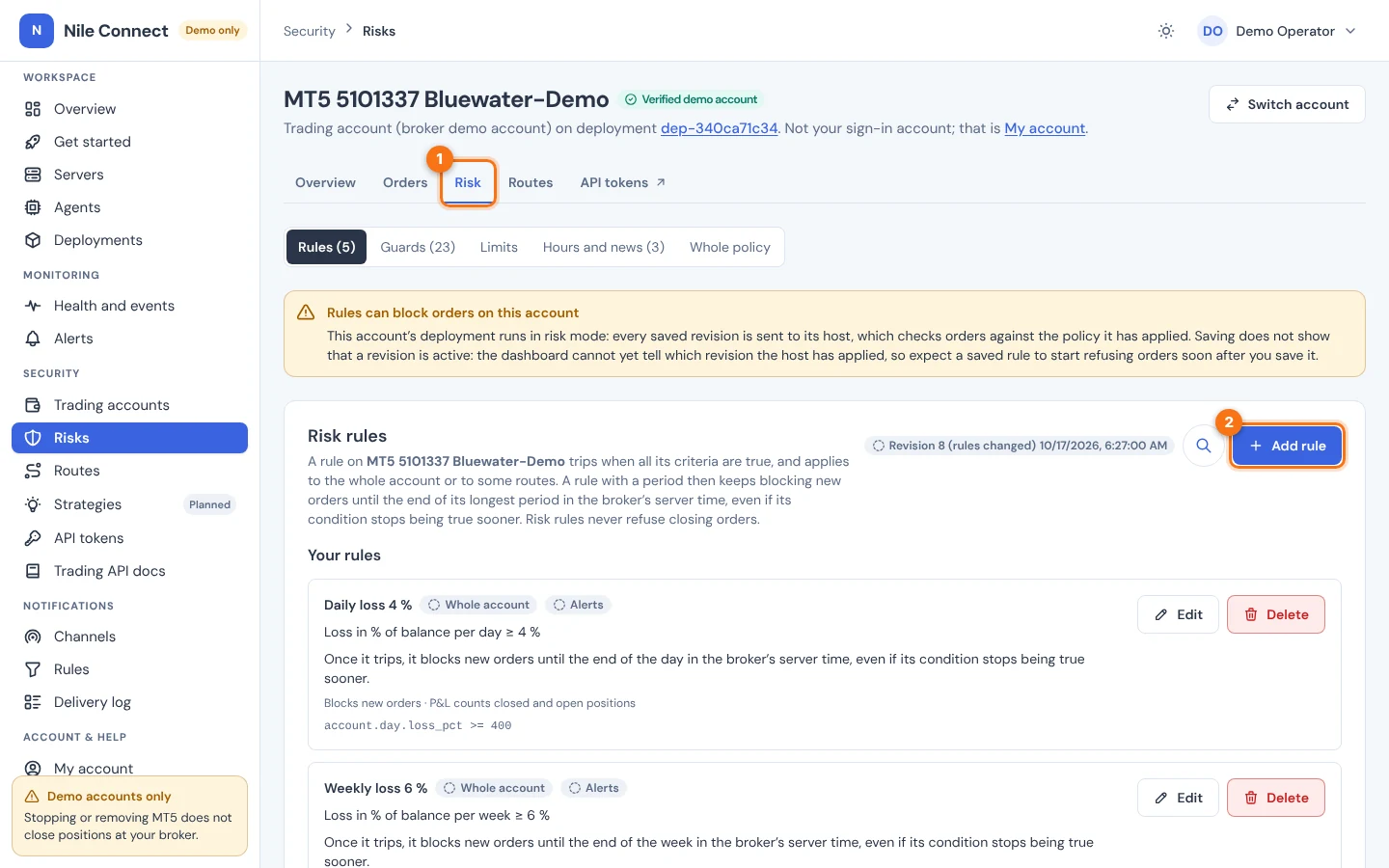
- Choose Risks in the sidebar (under Security) and pick the account, or open the account from Trading accounts. Open its Risk tab. For a route rule, open the Routes tab and choose Risk rules next to the route.
- In Rules, choose Add rule.
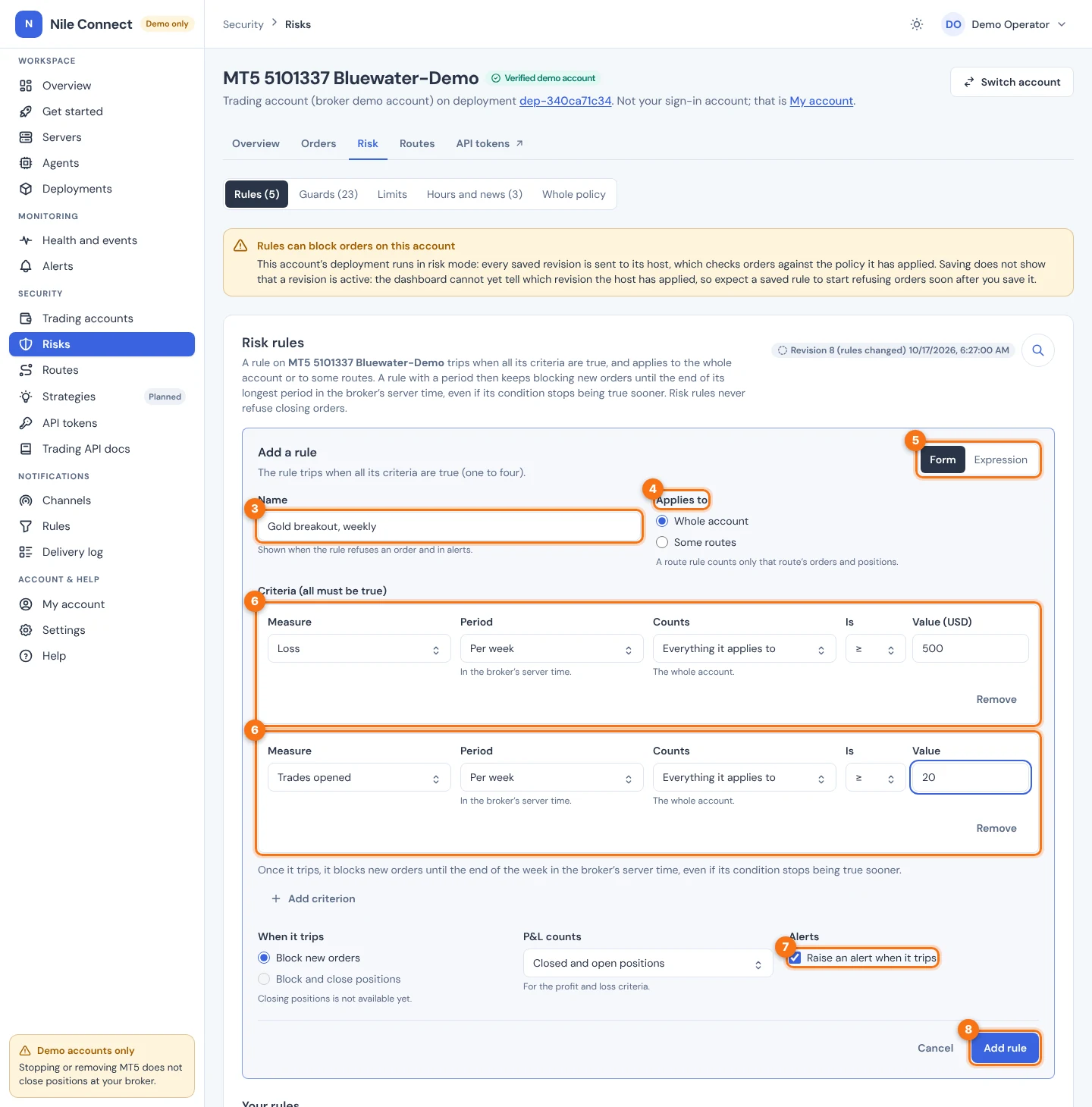
- Enter a Name. It appears when the rule refuses an order.
- Under Applies to, choose Whole account or Some routes and tick the routes.
- Under Edit as, keep Form, or choose Expression to type the criteria. Both always describe the same rule.
- Add up to four criteria with Add criterion. For each one, pick the Measure, the Period, what it Counts (the whole account or route, one strategy, one symbol, or both), the comparison Is and the Value. The form takes normal numbers, such as 500 for 500 USD.
- Check Raise an alert when it trips. It is on by default for profit and loss rules. The choice is saved with the rule, but trip alerts are not raised yet.
- Choose Add rule.
A policy holds up to 50 rules, and an expression up to 2,000 characters. If someone else saved the policy while you were editing, your save is refused. Cancel and edit again from the current rules. The Whole policy section shows every rule as one expression.
5. Examples
| GOAL | EXPRESSION |
|---|---|
| Daily loss limit of 500.00 | account.day.loss >= 50000 |
| Daily loss of 2 % of balance | account.day.loss_pct >= 200 |
| At most 10 orders per minute on a route | route.minute.orders >= 10 |
| No orders while the spread is above 30 points | order.spread_points > 30 |
| A strategy’s weekly loss and trade count, together | strategy.breakout.week.loss >= 50000 && symbol.XAUUSD.week.trades >= 20 |
A strategy name that is not a plain word goes in brackets, for example strategy[“mean-rev.v2”].
The dashboard saves rules with PUT /api/v1/trading/accounts/{account_id}/risk-policy/rules. The body replaces every user rule and must name the revision you edited. It needs a dashboard sign-in and the trading:configure permission; API tokens can never change rules.
Keep a rule’s id when you change it, so it keeps its identity and its latch. Read the current policy with GET /api/v1/trading/accounts/{account_id}/risk-policy. See the Trading API reference.
6. Check that the rules are enforced
Your rules run on your server, next to the terminal, only when the account’s deployment runs in risk mode. Risk mode is chosen when the deployment is created and never changes. The server’s agent policy must also allow it.
- Rules can block orders on this account: the deployment runs in risk mode. Each saved revision is sent to the server.
- Your rules are stored, not checked on this account: there is no risk-mode deployment. Only the guards from the limits are checked.
Through the API, the policy status.state is applied, pending, rejected (with the server’s reason) or control_plane_only. While a saved revision is pending, new opening orders are refused with risk_policy_pending. Closes are not held.
7. Clear a latch early
A latched rule stays latched until its period ends. A user with trading:configure can ask the server to clear it sooner. Every request is audit-logged.
- List the latched rules with GET /api/v1/trading/accounts/{account_id}/risk-policy/latches. Each one shows its latch_seq, its rule and when it ends (until, in broker server time).
- Ask for the clear with POST /api/v1/trading/accounts/{account_id}/risk-policy/latches/{latch_seq}/clear and the body {“rule_id”: “rule-7k2m9q4w”}. This needs a dashboard sign-in.
- Follow clear.state. It stays pending until the server answers, also while the server is unreachable. It then becomes cleared or refused.
Clearing a latch is available through the API only; the dashboard cannot do it yet. For the limits and guards, see Risk rules. For trading hours, market close and news windows, see time rules.