
Position protections
Give an open position a trailing stop, a break-even, a stop ladder, take-profit levels that close it in parts, or a time exit. The trading server runs them next to the terminal, so they keep working when the control plane or your own program is offline.
1. What a protection does
A stop loss and a take profit are fixed prices that the broker holds. A protection adds rules that move or use those levels while the position is open. Each position can have one protection, made of any of these rules:
| RULE | WHAT IT DOES | EXAMPLE |
|---|---|---|
| Trailing stop | The stop loss follows the price at a distance, and never moves back. | Once 10 pips in profit, keep the stop 20 pips behind the price, moving in 1-pip steps. |
| Break-even | Moves the stop loss to the open price (plus a little) after a profit. | After 15 pips of profit, stop at open + 1 pip. |
| Stop ladder | Locks in more profit at each step. | At +30 pips lock 10; at +60 pips lock 40. |
| Take-profit levels | Closes part of the position at each level. The last level is also the broker's take profit. | Close 40% at +20 pips, 30% at +40, the last 30% at +80. |
| Time exit | Closes the whole position at a time, or after a holding time. | Close at 16:55 before the weekend, or after 4 hours. |
Distances can be given in pips, points, % of price, money (in the account currency, for the position's current volume) or % of balance. The trading server converts them to prices from the quote it sees at that moment, and rounds so that a stop is never looser than you asked.
2. What you need
- An MT5 account whose deployment was created with Run in risk mode, on a server added with Allow risk mode.
- The MetaTrader 5 runtime image main-213a8d4 or later. Approve it under Servers → Images, then re-create the deployment on it. An older image answers not_supported_by_terminal.
- The permission positions:modify on the account (an API token with Full access has it).
- A symbol on which the broker accepts a stop loss and take profit.
3. Protect a position in the dashboard
- Open the trading account, its Orders tab, and under Open positions press Protect on the position.
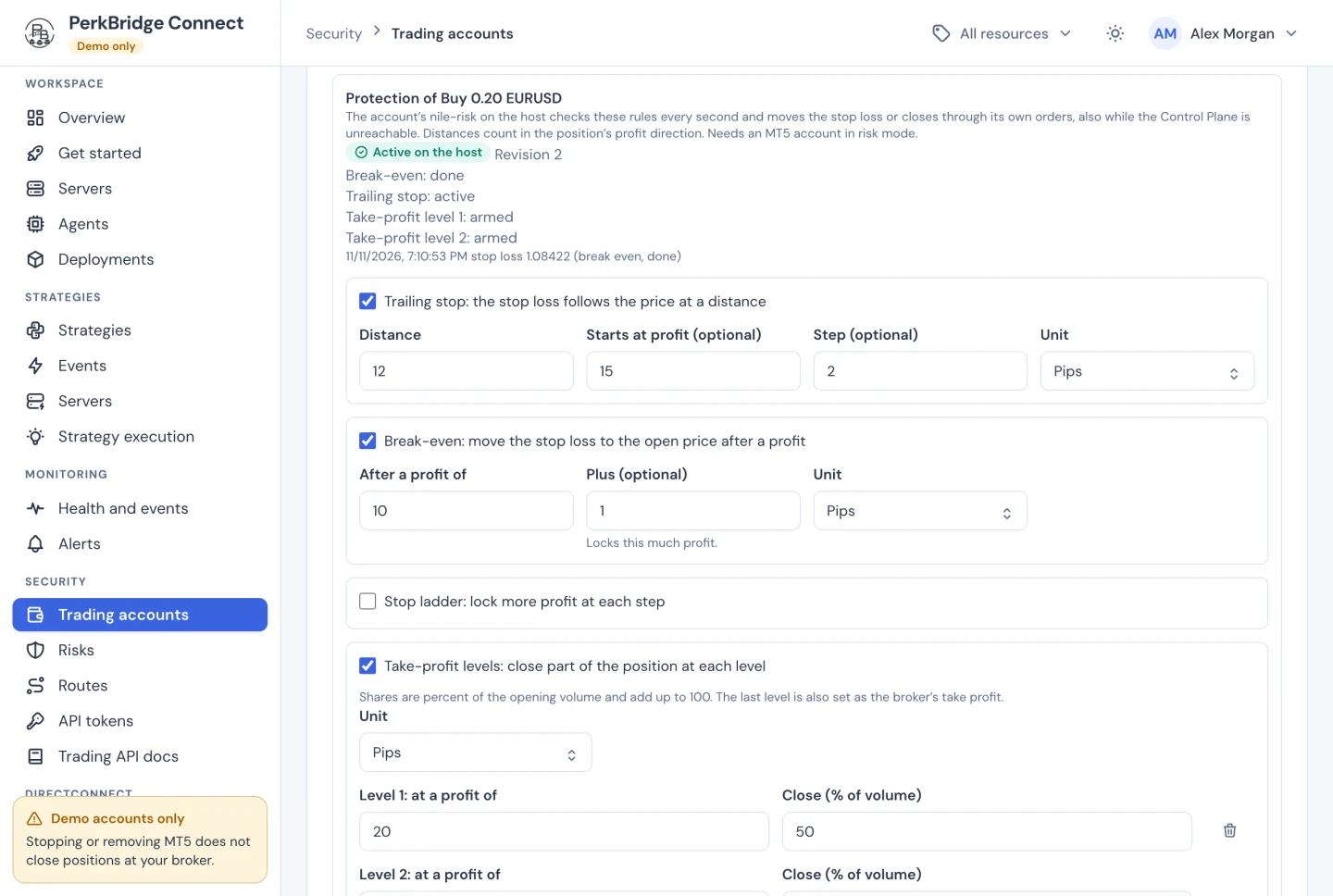
- Turn on the rules you want. For each, enter the distances and choose the unit. Under Distances count from, keep The open price.
- For take-profit levels, the shares are percent of the opening volume and must add up to 100.
- Press Save changes. The panel shows Waiting for the host to take it, then Active on the host within seconds, with the state of each rule (armed, active, done) and the last action.
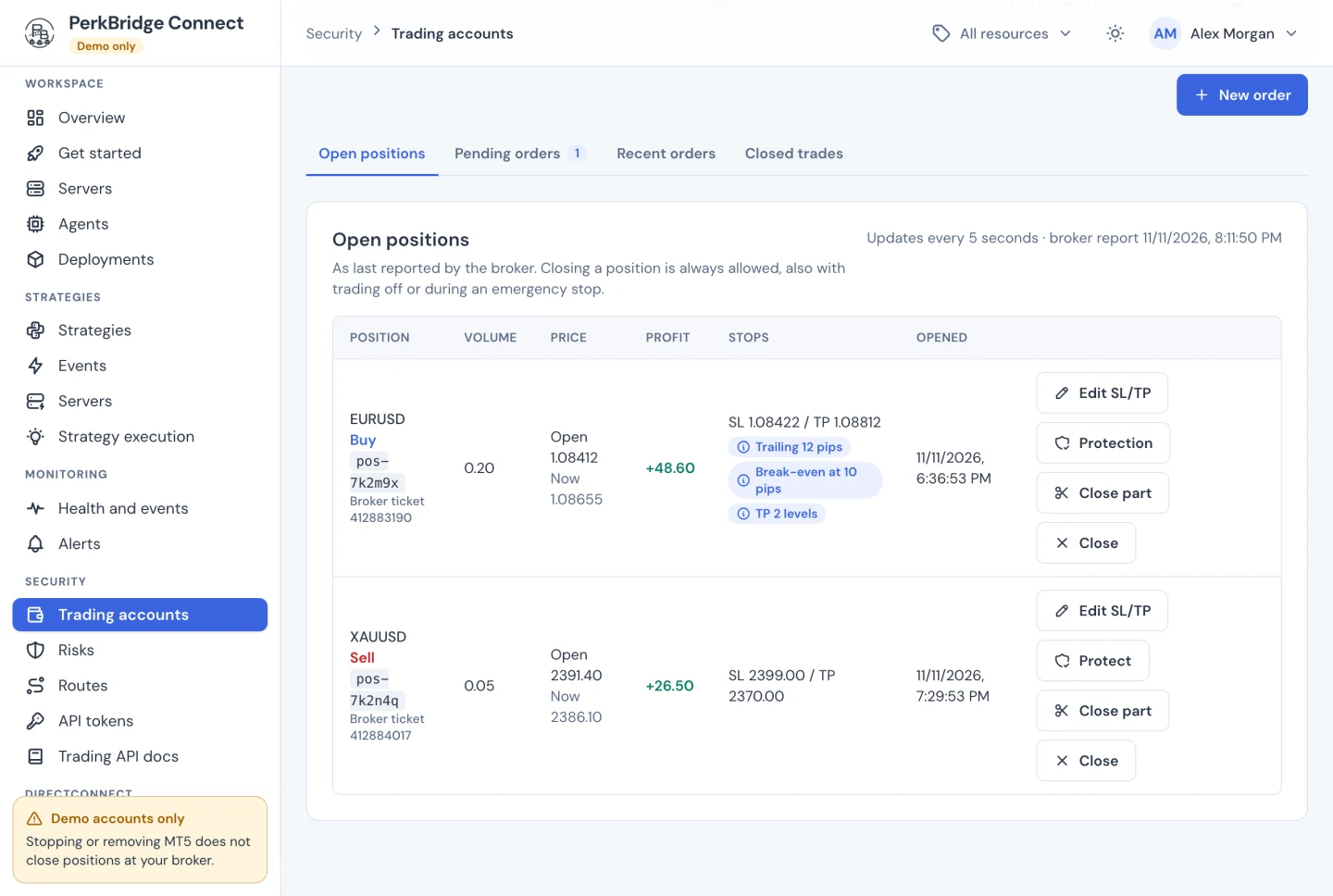
The position then shows chips that sum up its protection, such as Trailing 12 pips, Break-even at 10 pips and TP 2 levels. Next to them are Edit SL/TP, Protection, Close part and Close. Every stop move and partial close the protection makes appears on the Orders tab, marked as made by the protection, with the conversion it used. Remove ends the protection; the broker's stop loss and take profit stay where they are.
Protect the position an order opens
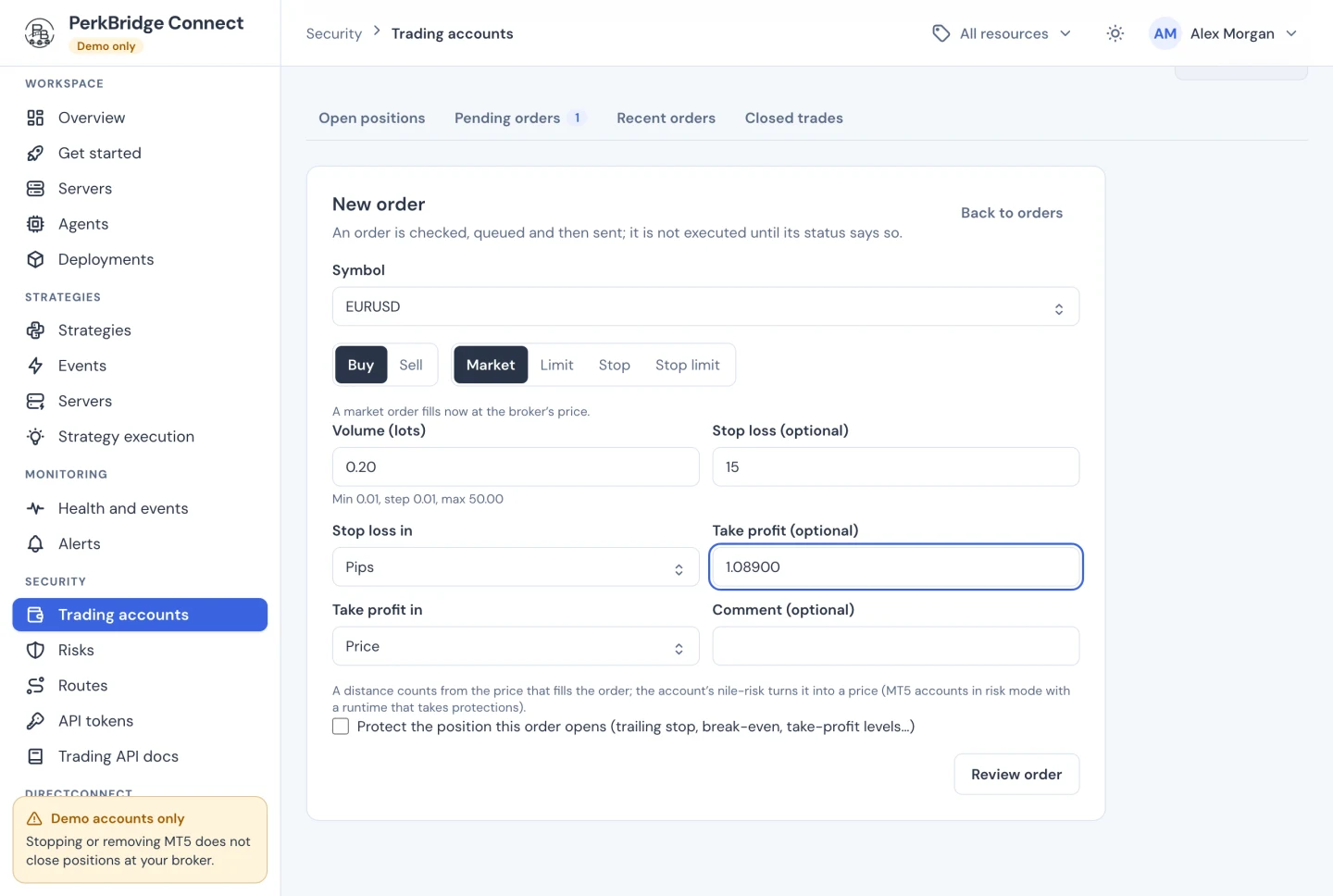
In the New order form, tick Protect the position this order opens and fill in the same rules. The protection starts as soon as the order fills. You can also give the order's own stop loss and take profit as a distance: choose the unit under Stop loss in and Take profit in.
4. With the Trading API
Set or replace the protection of an open position:
The answer is the stored protection with its revision, state and the state of each rule. GET …/protection reads it with the orders it produced, DELETE …/protection removes it, and GET /v1/trading/accounts/{account_id}/protections lists all of an account's protections.
Or open a position and protect it in one request: a market order with its stops as distances and a protection. Stops given as a distance need an account in risk mode; a plain price, such as "stop_loss": "1.0780", works on every MT5 account.
A position can also be closed in part, on the same runtime image: POST …/positions/{position_id}/close with {"client_order_id": "part-1", "volume": "0.05"}. The volume must be on the symbol's volume step and at most the position's volume; without it the whole position closes.
The fields
| FIELD | RULES |
|---|---|
| trailing_stop | distance required; activate (profit before it starts, default 0) and step (smallest move) optional. |
| break_even | trigger required; offset towards profit, default 0. Fires once. |
| stop_ladder | 1 to 10 rows of threshold (rising) and stop (the profit to lock, not falling). |
| take_profits | 1 to 5 rows of level and share; the shares are whole percents adding up to exactly 100. The last row is set as the broker's take profit. |
| time_exit | One of at (a UTC time in the future) or after (seconds since the position opened, 60 to 2 592 000). |
| anchor | open (default): distances count from the open price. fill: on an order, also re-set the order's stops once from the real fill price. |
| A distance | {"value": "20", "unit": "pips"}; units pips, points, percent, money, percent_balance, or price for an absolute level. |
When several rules want a stop in the same moment, the one best for you wins (the highest stop for a buy, the lowest for a sell), and one change is sent.
5. Good to know
- Protections only tighten or close. They never move a stop against you and never open a position. They work during an emergency halt for stop moves; closes follow the halt's close rules.
- The stop moves at most every 5 seconds per position, and by at least one point. A broker that answers "too many requests" pauses the account's protections for 30 seconds.
- A rule that fired never fires again, also after a restart or a failover: the trading server keeps a journal of every action.
- Money and % of balance need the terminal to report the symbol's tick value; otherwise use pips (unit_unavailable).
- A position opened outside PerkBridge can be protected too; the panel says so.
- Up to 200 protected positions per deployment.
| ANSWER | MEANING |
|---|---|
| protections_unavailable | The account is not in risk mode. |
| not_supported_by_terminal | The deployment runs an image older than main-213a8d4. Re-create it on the new image. |
| position_not_found | The position is not open in the last report. |
| stops_not_supported | The broker does not accept stops on this symbol. |
| protection_invalid | A field is wrong; the answer names it. |
| unit_unavailable | Money or % of balance on a symbol without a tick value. |